Validation and estimation for Assumed Meter Time (AMT)
As part of Itron’s continuous improvements across all product platforms, devices no longer require a battery to remain operable while running supported firmware versions. The updated firmware introduces additional logic that provides customers with an end-to-end solution when devices are operating under AMT.
Note: AMT functionality is supported in IEE version 10.3 Service Pack 4 and later.
Assumed Meter Time (AMT)
When a power restoration occurs after an outage with a dead battery, the meter enters AMT mode.
Upon an outage with a low battery, once a power restoration occurs, the meter will enter AMT.
-
Time stamping upon restoration is defined as +5 seconds from the last recorded outage.
-
The load profile will continue to run and is time stamped based on AMT time.
-
The lost (dead) battery event will be triggered, if configured.
-
The meter will become an energy-only meter where time keeping functionality, such as demand and time-of-use (TOU), is suspended.
Upon a time-sync via the network or local tools, all time keeping functionality will resume as normal.
-
Demand resumes immediately upon exiting AMT and TOU resumes allocation to the appropriate TOU rate buckets.
-
Profiles start recording interval data in the appropriate interval, profile intervals during AMT get skipped.
The following are AMT supported devices and firmware versions:
-
OpenWay CENTRON running firmware 7.0.187 or higher
-
OpenWay Riva running firmware 5.4.398 or higher
-
Gen5 CENTRON running firmware 2.008 or higher
-
Gen5 Riva running firmware 10.8.569 or higher
Configuring validation to identify AMT intervals
This section discusses reading status mapping and user-defined validation rule for configuring validation to identify AMT intervals.
Reading status mapping
For OpenWay CENTRON, the AMT status codes coming from OpenWay Collection Engine (OWCE) or OpenWay Collection Manager (OWCM) head end systems need to be mapped (in IEE) to IEE reading status codes.
|
OWCE/OWCM head end's AMT flags for OpenWay CENTRON |
IEE's mapped reading status codes |
|---|---|
|
ClockResetBackwards |
CLOCK |
|
HardwareFailure |
IOBOARD |
|
PartialInterval |
IRREGULAR |
|
PowerFailure |
POWER |
|
TimeError |
TIMERESET |
For Gen5 CENTRON, the AMT status codes coming from UtilityIQ head end system needs to be mapped on the Integration Management Service (IMS) to the corresponding OpenWay status codes.
|
UtilityIQ's AMT flags for Gen5 CENTRON |
Mapped by IMS to OpenWay status codes |
|---|---|
|
Clock reset backward during interval (std table 64) |
ClockResetBackwards |
|
POWER_FAILURE |
PowerFailure |
|
CLOCK_ERR |
TimeError |
|
SYSTEM_ERR |
HardwareFailure |
|
Partial interval due to common state (std table 64) |
PartialInterval |
Note: The above reading status code mappings are the default, standard mappings and should not be changed or customized.
User-defined validation rule
To identify AMT intervals from OpenWay CENTRON and Gen5 CENTRON devices, Itron recommends that utilities implement the following user-defined validation rule in IEE MDM, which identifies all five AMT reading status codes.
The user-defined validation rule uses a named formula to identify the reads eligible for AMT using the following formula:
@if(@status($input \AND, CLOCK, IOBOARD, IRREGULAR, POWER, TIMERESET), @if(@statuscount($input \AMT) = 0 OR @status($input \AND, ESTNEEDED), 1, 0), 0)
Important! You must first create the named formula.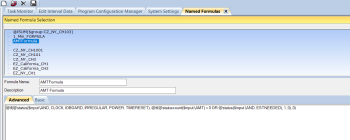
Configure the validation rule's parameters as follows:
-
Named Formula ID. From the dropdown menu, select the named formula.
-
True Result Triggers. From the dropdown menu, select FAIL.
-
Route to Queue (Do not auto estimate). Leave the checkbox blank.
-
True Results Status. From the dropdown menu, select AMT.

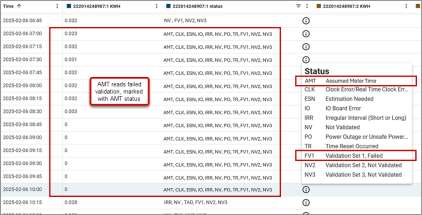
The following example shows AMT intervals that have been identified by the user-defined validation rule. The intervals are marked with AMT Failed Validation (FV) and Estimation Needed (ESN) status codes. The validation failure was sent to the Validation queue.

Note: The guidance for identifying AMT intervals from OpenWay Riva and Gen5 Riva devices will be added to this topic later.
Follow up actions
Once the AMT intervals are identified, the following are actions that can be taken:
-
If the end customer is on register-based billing, billing is not affected as it does not use this data. The AMT intervals can be manually accepted.
-
If the data is provided to the end customer (for example, through a Customer Portal), exclude these AMT intervals.
-
If the data is used for non-TOU interval-based billing, the AMT intervals can be estimated and scaled against meter readings before billing.
-
If the data is used in TOU billing, the AMT intervals can be estimated or edited before billing. For example, by replacing them with zeros or by shifting the interval time stamps.
Configuring estimation to zero fill AMT intervals
This zero filling is performed by IEE's validation and estimation process and is only applicable to OpenWay CENTRON and Gen5 CENTRON. If there is an external system that subscribes to the data prior to this validation estimation (VE) process (for example, by subscribing to OpenWay head end directly, or using an Import Data Manager (IDM) routing program), the data will not be zero filled.
Note: This estimation only zero fills reads that are marked with AMT status codes. It does not correct the TIME ADJUSTED interval read that follows the AMT reads.
Configure the Numeric Replacement estimation routine's parameters as follows:
-
Value to substitute when performing estimation. In the space provided, enter 0.
-
Only estimate reads with this status. From the dropdown menu, select AMT. When this parameter is set to a status, the routine will only estimate the reads if the reads have the specified status. If set to None (default), all reads with Estimation Needed status will be estimated.
-
Exclude from scaling. Select the checkbox so that the zero replacements will not be adjusted by the scaling process.

Important! The Numerical Replacement estimation routine used for estimating AMT intervals should always be configured as the first routine in the estimation set. AMT related status codes (AMT, CLOCK, IOBOARD, IRREGULAR, POWER, TIMERESET) must not be configured as "Statuses to ignore", otherwise this routine skips the estimation.
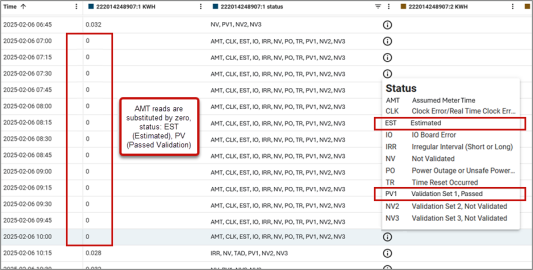
The following example shows AMT intervals that have been zero filled by the Numerical Replacement estimation routine. The intervals are marked Estimated (EST) and Passed Validation (PV).
Note: The guidance for identifying AMT intervals from OpenWay Riva and Gen5 Riva devices will be added to this topic later.
Related topics: